
Many small business owners like SEO as it’s ‘free‘ organic traffic, and having top rankings on Google is reputable for their business. If you’re a DIY micro business owner like me, then you may be interested in a SEO tools stack that took a complete SEO beginner like me from 1k to 20k in global traffic in 8-12 months.
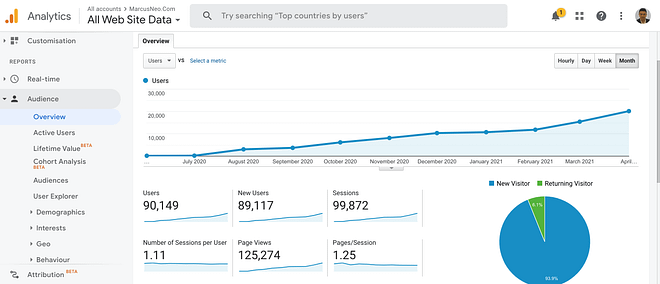
I didn’t get this traffic with complicated SEO tools. I built this site from my HDB bedroom with just a couple of paid SEO tools.
SEO Tools for Small Businesses… Keep It Simple or Complex?
For web designers, bloggers, content writers and digital marketers new to SEO, the tools associated with SEO can seem intimidating.
There are complex software tools in the SEO market that calculate keyword density and latent semantic indexing keywords, feed it into AI and give recommendations. This causes SEO to be perceived as a complicated process involving multiple scary looking third party tools.
I personally don’t enjoy complicated processes and prefer to keep SEO simple by maintaining a lean SEO tool stack. Especially if you’re a micro business owner providing localized services, such as dentist, lawyer, physiotherapist, etc. You won’t be needing complex tools!
Tools For Technical SEO Audits
Let’s start off with technical SEO audits. I wasn’t a fan of technical audits, as I preferred to focus on link building in my earlier SEO career. However, in agency work, the first service an SEO consultant can value add in is analyzing the technical fundamentals of a client’s website.
Screaming Frog
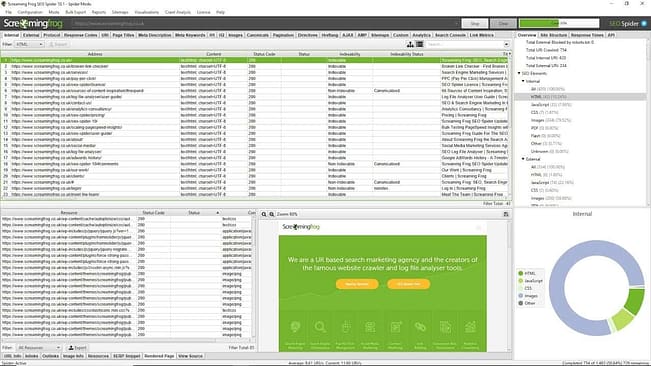
The free version of Screaming Frog is good enough for a DIY audit.
Ahrefs Site Audit Tool
The Ahrefs site audit tool is able to look at everything from broken links to technical SEO errors such as missing meta descriptions. It also sends you automated periodic reports on your site’s health.
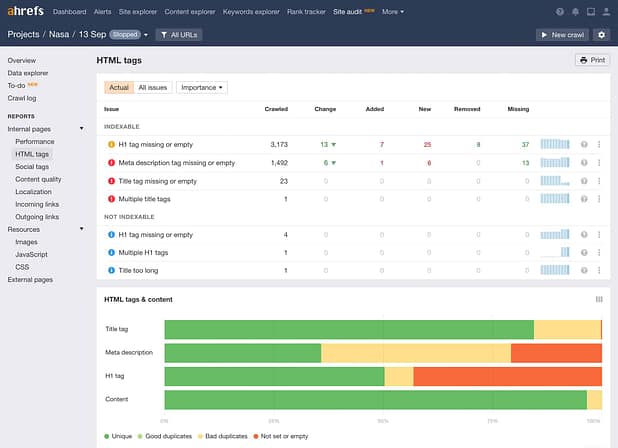
If you’re on a paid plan, I highly recommend you use it. Let’s move on to keyword research tools.
Keyword Research SEO Tools
Google Keyword Planner
You can start with Google Keyword Planner and your own Google Search Console. They are both free and provide data from the horse’s mouth (Google) itself.
Google Search Console
Yes, there are third party keyword research tools too such as Ahrefs and Semrush.
Note, these tools don’t actually pull actual data from Google. They reverse engineer keyword volume from different sources, and give good estimates at best.
‘Search engine technologies such as SEMrush, or Ahrefs use Clickstream and Web Browser extensions to track user behaviors to determine search demand by using their AI algorithms to predict specific search demands.’
Tools for Backlinks Prospecting and Research
Ahrefs, Semrush for Traffic, Backlink Analysis
Ahrefs is not called the Swiss Army knife of SEO tools for nothing. Ahrefs can do everything from keyword research, backlinks research, keyword rank tracking to providing a technical SEO site audit.
Not to mention, they recently introduced an affordable starter’s plan. Today, Ahrefs has a $29 starter plan. This is affordable compared to back in the day when they only had $97 plans.

I mainly use Ahrefs or SEMrush for competitor insights, traffic research and link building analysis. Ahrefs also has an alert feature where you can monitor your backlink profile, alerting you to lost or gained links.
There’s a consensus amongst SEOs that sites with at least 300 to 1000 organic traffic demonstrate that they are trusted by search engines. They are considered high quality sites. I personally only place on sites that generate at least 100 organic visits unless they have exceptional relevancy.
The quality of organic traffic is one of the key factors you should account for when assessing link building opportunities.
Ahrefs and SEMrush can help analyze a website’s organic traffic by showing you the keywords it ranks for and the estimated traffic the site generates.
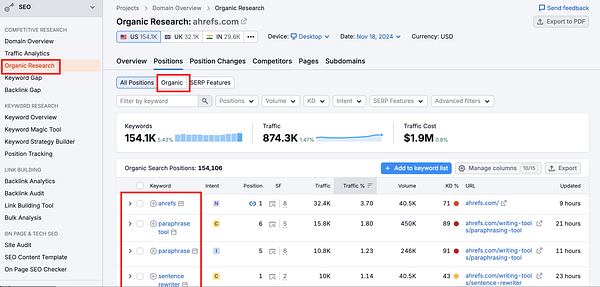
Now, you might ask, how about domain authority or domain rating?
In my experience, high domain authority or rating is one of the most overused metrics. There are countless high domain rating sites out there that struggle to rank for any meaningful keywords.
Today, domain rating can be manipulated by sending low quality links to inflate the score. This contradiction became even more apparent after the helpful content update. There were many high domain rating sites that saw their traffic plummet.
Our link building team uses domain authority/rating sparingly when assessing a website’s overall strength and credibility.
Majestic SEO for Relevancy
When evaluating a potential backlink source, you can look for keywords that are related to your niche or industry. They don’t have to be 100% niche related. You can also consider parallel niches. For example, if a small business service site links to my SEO agency site, that is 100% fine too.
Good link building prioritises links from highly relevant sites.
I use Majestic SEO for backlink evaluation. The theory being, you’ll only want to reach out to highly relevant sites to build backlinks.
Majestic SEO is the only tool out there that provides the metric of Trust Flow. Majestic SEO is able to give you a good estimate of how relevant the site is to the niche of your site.
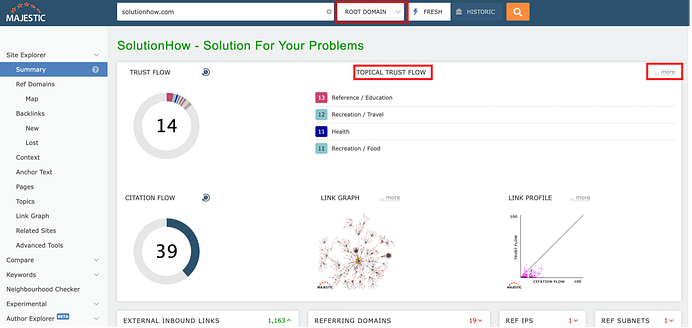
Personal experience seems to have backed me up. I had good growth of traffic only after building highly relevant links to my website. Google’s leaked API also confirms that link relevancy is a factor they look at.
Our team uses Majestic SEO extensively to filter for relevancy. I use Majestic SEO because it’s the only SEO backlink analysis tool out there that breaks down relevancy to a numerical form. To understand trust flow in depth, you can read more about it here.
Keyword Ranking Tracking Tools
Ahrefs Rank Tracker
If you’re already on Ahrefs, then there’s a rank tracker included. The lower plans in Ahrefs have a limit on the number of keywords you can track. However, if you’re managing just a couple of sites or even just your own site as a small business owner, I assure you it’s more than enough.
Google Search Console
It’s not exactly a rank tracker, but Google Search Console gives you an ‘average’ keyword (query) position ranking. You can do this by checking Google Search Console data under Search Results: Queries and Pages.
The best part? It is free.
Outreach Tools for Link Building and Outreach
Let’s get to link building! I’ve also written about the affordability of link building in another article. Now, let’s take a look at the cost of tools involved.
Hunter.IO
I use Hunter.IO to get email addresses for link building outreach. Hunter.IO is simple to use. Simply plug in a website and get the contact information almost immediately. You can also bulk find emails. This is extremely useful for guest blogging and skyscraper research.
Hunter.IO also includes an email verification feature on their platform. You can verify the emails before sending outreach emails, helping with deliverability.
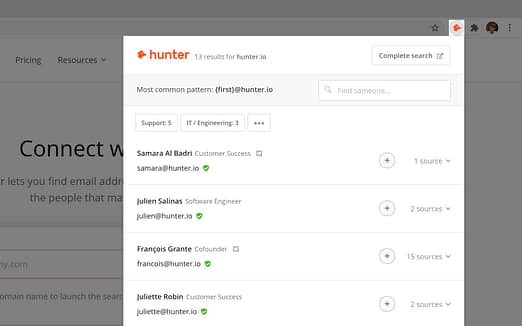
The cost is around 49 USD per 2000 credits. It’s enough for a micro business owner looking to get their hands dirty with DIY link building.
Mailshake
I tested both Mailshake and Lemlist for automated outreach campaigns and found that both are great. Lemlist has a pretty cool user experience, and on the other hand Mailshake is more straightforward.
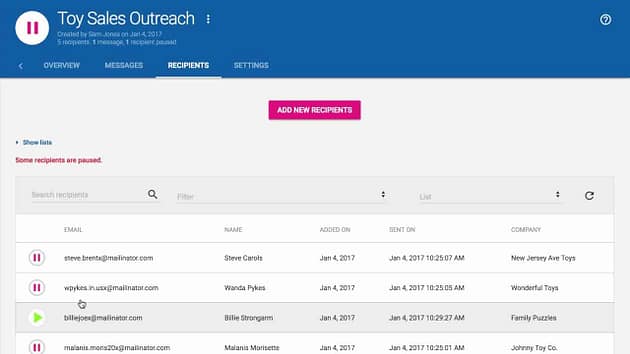
These tools offer features such as drip campaigns and customizable personalization. You can incorporate dynamic fields in your emails to insert recipient specific details.

They provide personalization that helps with both response rates and deliverability. Note, one of the most important keys to successful email outreach campaigns is deliverability. Hence, don’t forget to get your SPF, DKIM, and DMARC set up as well.
On Page SEO Tools
All in One SEO
I started off with All in One SEO and stuck to it since. I know many recommend RankMath but it doesn’t matter. Simply pick one and focus on other aspects of SEO such as link acquisition.
Broken Links Checker
You can use the broken links checker site. It’s free. Or run your site through Ahrefs site audit to check for broken links.
My Top Data Analytics, Tracking and Reporting Tools
Google Tag Manager
Today, as a marketing agency owner serving boutique firms in the legal industry, I find it surprising when clients tell me they are running thousands of dollars in ads and not doing any proper tracking!
Through GTM, you can implement conversion tracking from multiple pixel sources just by installing ONE Google Tag script in the code base of your content management system or static website.

There is a learning curve. However, it’s not too complex and I highly recommend you pick it up!
Google Analytics 4
This is the bread and butter tool for digital traffic analytics. Google Analytics 4 gives you data on user acquisition, engagement rates and bounce rates. You can set up conversion tracking, look at user flow and build out custom reports.
Useful for when you’re buying traffic from multiple sources, such as Meta and Google Ads, and separating it from organic SEO traffic.
Google Search Console
GSC helps with looking at indexing errors, queries, and position on the search results for different keywords.
You can compare your pages with impressions and click through rates. This is data from Google itself, hence you could say it’s more reliable compared to third party tools.
Google Page Speed Insights for Page Speed
Google Page Speed Insights is a tool developed by Google to test your website’s speed performance. Enter the URL of the website into Google Page Speed Insights and it will run a diagnostic for you.
You can then get a professional web developer to fix the errors for you. You can audit page speed through Screaming Frog via response time.
Tools for Local SEO
Google My Business Profile
Local SEO can be a game changer for a small business. You can get ranked over traditional SEO results in the maps pack for highly commercial keywords.
You can get listed on Google Maps pack for FREE.
SEO Content Marketing Needs
Upwork
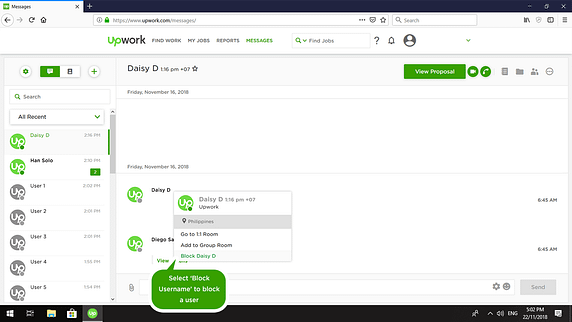
If you’re outsourcing SEO content, or hiring web development fixes from your technical SEO audit, you can consider Upwork. I use it for most of my outsourcing efforts.
You can find cost competitive talent on Upwork. I hire the majority of my writers from Upwork. My offshored SEO team was also hired on Upwork.
I like Upwork’s team management process. The ability to keep it simple with their messaging platform. Yes, they charge fees and take a percentage. But at the end of the day you are paying for a simplified HR system and payment system.
There’s no need for you to manually log into your bank to transfer money to a freelancer. This makes my life easier as they simply charge to your card and send you an invoice.
Secondly, I like Upwork’s hourly screen monitoring feature. If you have contractors working for you by the hour, this feature comes in handy.
Claude
LLM wise, I use Claude to help with content marketing. You can do a lot with their projects function and Claude’s models learn the best from your writing style. Claude beats ChatGPT in my opinion, and other LLMs when it comes to content.
I pay for the pro version and it is well worth it.
Copyscape
Copyscape is used to check for plagiarism and duplicate content if you outsource your content. It’s not entirely free, but it’s extremely low cost. If you’re going to outsource your content, it’s important to check against plagiarism (duplicate content is a big no no in Google’s eyes).
High quality and researched content can’t be written by robots.
Images: Canva, Flickr
Canva is awesome for the basic designer. It’s a surprisingly user friendly tool. I use it to create basic PDFs, WordPress featured images, etc.
I use Flickr because some of their images are awesome, and they’re free to use under license. They are a lot more unique than the run of the mill Google search.
Project Management Tools for SEO
Google Workspace, Google Sheets and Google Docs
There’s nothing like using Google Docs for project management. So much so that if a contractor sends me a Word document, it ruins my day.
I use Gmail, Google Sheets and Google Docs to manage the entire SEO process. Everything from keyword research, outreach, technical audits, content placement coordination and link building delivery.
In my unpopular opinion, Google Sheets beats all other project management tools hands down any day of the week. It’s simple to use and easily malleable.
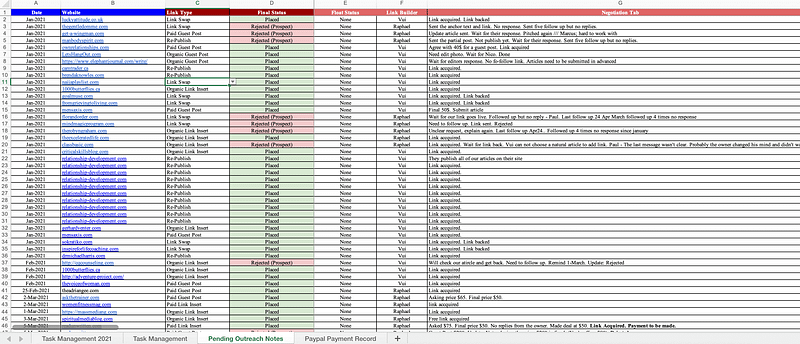
Google Sheets and VLOOKUP
I use the VLOOKUP function in Google Sheets to pull data from a “main database.” You’re bound to have many different “databases” for outreach prospects. For example, local publishers, prospects from skyscraper and guest post research.
I highly recommend learning VLOOKUP. It is an extremely helpful Google Sheets function. The same prospects may appear in multiple link prospect databases. Thus it is important to reference the same main databases. This keeps your data accurate and avoids duplication.
You’ll also spend less time and money on prospecting tools, research tools and VAs.
How I Think about SEO Tools: Staying Lean for SMEs
SEO can be a complicated process from the get go. If you’re going to include too many third party tools in your process, you’re only going to confuse yourself.
Keep your SEO tools stack lean, efficient and mean.
Inevitably, there are other costs such as link building costs, content marketing costs, and web development costs that come along. You’re better off focusing on allocating resources to those areas as opposed to overspending on your SEO tools stack.
